
Deploy di un sito Hugo su AWS S3 mediante Gitea Actions
Dopo aver configurato Gitea e Hugo su AWS S3...
Il prossimo passo è implementare un sistema CI/CD e configurare Gitea Actions per il sito Hugo, per spingere il sito su AWS S3 automaticamente quando il ramo master viene aggiornato.
Abbiamo già - dopo aver installato, configurato e testato Gitea Configurazione del server Gitea, e configurato Gitea SSL, configurato il deploy del sito Hugo su AWS S3.
Questa guida fa parte della nostra documentazione sull’infrastruttura web che copre le strategie di deployment AWS. Per la configurazione della distribuzione CloudFront, consultare creazione di CloudFront con pagamento per uso effettivo. Puoi anche esplorare il deploy di Hugo con AWS CLI per approcci di deployment alternativi.

OK. Procediamo
Generare un nuovo token per il runner Gitea
Vai su https://your-gitea-server/your-user/your-repo/settings/actions/runners
e fai clic su Crea Nuovo Runner
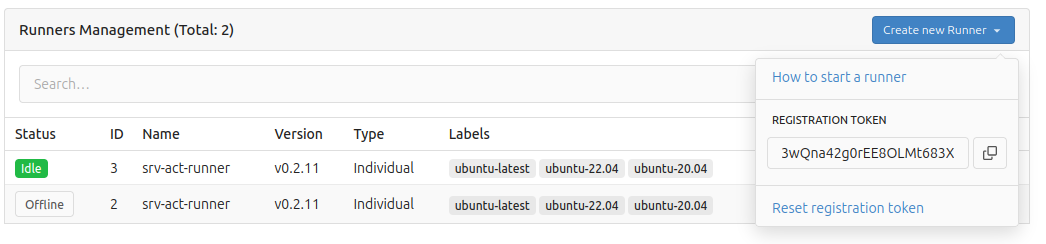
copia il Registro Token
Avviare il nuovo runner Gitea
Esegui ssh sul server dove verrà eseguito il nuovo runner gitea
e avvia il container docker. Puoi avviarlo come eseguibile separato, eseguirlo come servizio ecc., ma qui sto utilizzando un container docker.
sudo docker run \
    -v /var/run/docker.sock:/var/run/docker.sock \
    -e GITEA_INSTANCE_URL=http://<my-gitea-server>:3000/ \
    -e GITEA_RUNNER_REGISTRATION_TOKEN=<my-registration-token> \
    -e GITEA_RUNNER_NAME=srv-act-runner \
    --name my_runner \
    --restart always \
    -d docker.io/gitea/act_runner:latest
Verificare che il runner si sia registrato correttamente
Vai su https://your-gitea-server/your-user/your-repo/settings/actions/runners
e dovresti vedere che è già in esecuzione
Creare alcune secret AWS
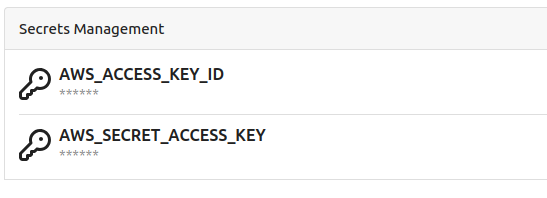
Vai su: https://your-gitea-server/your-user/your-repo/settings/actions/secrets
E crea un paio di secret molto importanti: AWS_ACCESS_KEY_ID e AWS_SECRET_ACCESS_KEY. Sai cosa significano, giusto?
Creare un workflow Gitea per la build e il deploy di Hugo su s3
Nel tuo progetto hugo, nella cartella .gitea/workflows crea un file hugo-deploy.yaml
name: Gitea Actions - Hugo Deploy
run-name: ${{ gitea.actor }} is testing out Gitea Actions 🚀
on:
  push:
    branches:
      - master
jobs:
  Hugo-Deploy:
    runs-on: ubuntu-latest
    steps:
      - run: echo "🎉 The job was automatically triggered by a ${{ gitea.event_name }} event."
      - run: echo "🐧 This job is now running on a ${{ runner.os }} server hosted by Gitea!"
      - run: echo "🔎 The name of your branch is ${{ gitea.ref }} and your repository is ${{ gitea.repository }}."

      - name: Check out repository code
        uses: actions/checkout@v4
        with:
          submodules: true  # Fetch Hugo themes (true OR recursive)
          fetch-depth: 0    # Fetch all history for .GitInfo and .Lastmod

      - run: echo "💡 The ${{ gitea.repository }} repository has been cloned to the runner."

      - name: Setup Hugo
        uses: peaceiris/actions-hugo@v3
        with:
          hugo-version: '0.134.1' # or remove this for the latest
          extended: true

      - name: List files in the repository
        run: |
          ls

      - name: Build
        run: hugo

      - name: Deploy
        run: hugo deploy
        env:
          AWS_REGION: 'ap-southeast-2'
          AWS_ACCESS_KEY_ID: ${{ secrets.AWS_ACCESS_KEY_ID }}
          AWS_SECRET_ACCESS_KEY: ${{ secrets.AWS_SECRET_ACCESS_KEY }}

      - run: echo "🍏 This job's status is ${{ job.status }}."
Qualora non avessi un enorme desiderio di ospitare il tuo sito a Sydney - cambia AWS_REGION in quello che preferisci.
Questa parte della configurazione:
on:
  push:
    branches:
      - master
gestirà tutti i push e i merge nel ramo master.
Commit e push
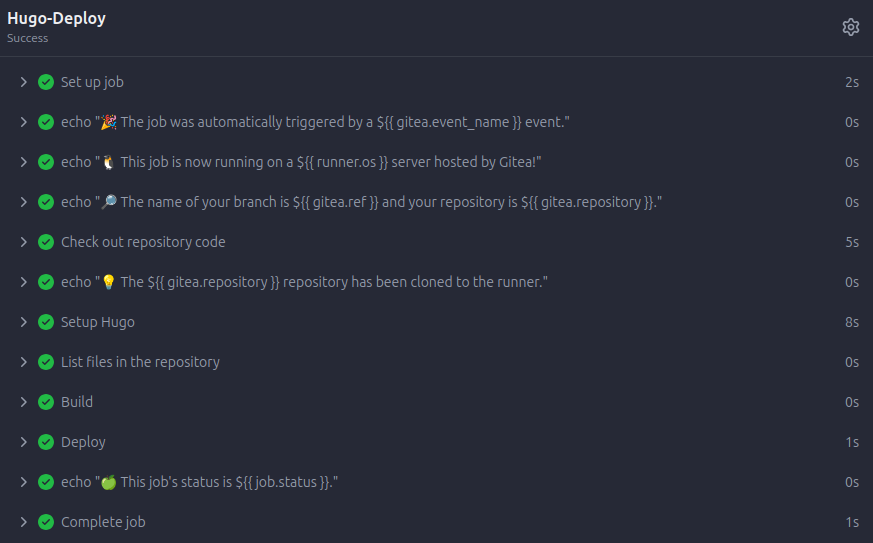
Dopo aver spinto le modifiche al server, dovresti vedere nella pagina https://your-gitea-server/your-user/your-repo/actions qualcosa di simile a
Buona giornata! Una volta che il tuo runner Gitea Actions è stato distribuito e sta costruendo il tuo sito, ricorda che l’istanza che lo esegue ha ancora bisogno della sua stessa rete di sicurezza - consulta Backup e Restore del server Gitea per il flusso di lavoro del gitea dump.
