
A2A Streaming and Async Tasks for Long-Running Agent Workflows
Long-running A2A tasks outlive chat sessions.
Most AI agent demos still behave like chat completions with extra steps: you send a prompt, wait a few seconds, and get an answer back in one response.
Real agent work often does not fit that pattern. Research, code review, procurement analysis, incident investigation, and multi-step planning can run for minutes or hours, and they may need clarification halfway through, stream partial results, delegate to another agent, and produce files rather than a single text reply. That is where the A2A protocol’s async model matters within the broader AI Systems cluster, because A2A treats long-running work as a Task with a lifecycle instead of a one-shot HTTP response. Clients can stay connected via Server-Sent Events (SSE), poll task state, or register push webhooks when they cannot hold a connection open.
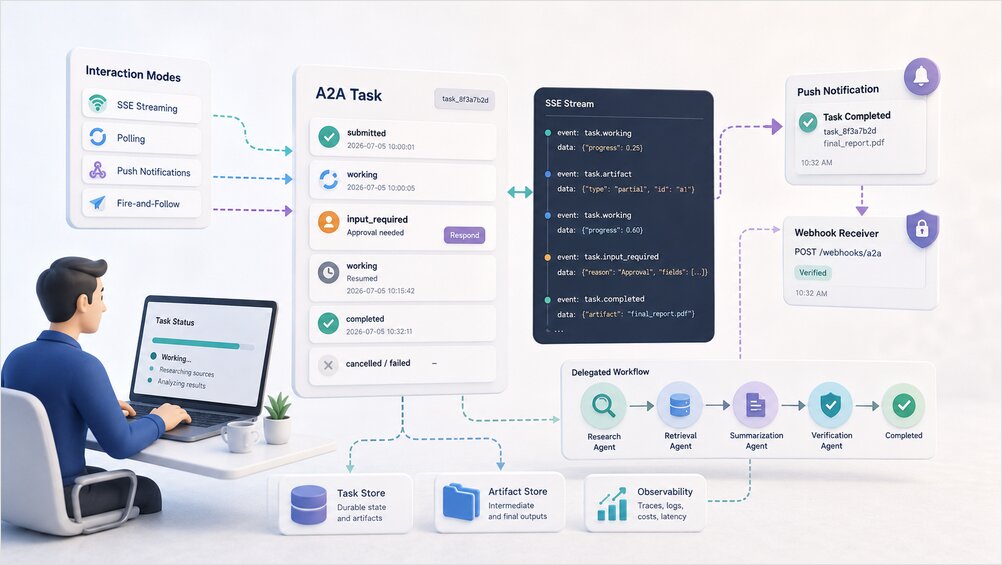
This article covers operational design for those workflows, including when to stream versus poll versus push, how input_required fits human-in-the-loop flows, failure handling, and what to instrument in production. For Agent Cards, messages, parts, and the full task model, see What Is the A2A Protocol? Agent Cards and Tasks Explained.
Why Long-Running A2A Agent Tasks Need Async Design
A synchronous request/response mental model breaks down quickly once agent work spans tools, delegation, approvals, and large artifacts. An agent task may call multiple MCP servers internally, delegate sub-work to another agent over A2A, wait for human approval, generate large artifacts in chunks, fail partway through and need partial recovery, and accumulate token cost across several hops. HTTP APIs can approximate this with timeouts, background jobs, and ad hoc status endpoints, but A2A bakes task identity and state into the protocol so clients and gateways can reason about work consistently. For how those layers fit inside a production assistant before you add async A2A boundaries, see AI Assistant Architecture: LLM, Memory, Tools, Routing, Observability.
My bias is practical: do not create a Task for everything, because a one-line summary does not need a lifecycle. Use a Task when work is stateful, auditable, long-running, artifact-producing, or may need input mid-flight. The rule of thumb from the explainer still holds: simple interactions can return a Message, while complex work should return a Task.
A2A Task Lifecycle and State Transitions
An A2A Task moves through states that clients can query at any time. Exact naming varies slightly by implementation, but the model is stable across servers that follow the protocol.
The submitted state means the client sent work and the agent accepted or queued it. In working, the agent is actively processing, which may include tool calls, delegation, or streaming partial output. The input_required state indicates the agent paused because it needs more input, clarification, or human approval, and it is not a failure state. completed is terminal success with artifacts available; failed is a terminal error whose details and partial artifacts depend on implementation; canceled means a client, gateway, or authorized caller stopped the task; and rejected means the agent refused the task because of policy, capability mismatch, or auth.
When input_required pauses versus fails a workflow
Treat input_required as a deliberate pause, not an exception. The agent is telling you it cannot proceed without something from you, whether that is a missing parameter, a policy confirmation, or a manager sign-off on a high-risk action. A workflow fails when the task reaches failed or rejected, or when a caller exceeds a timeout waiting for input that never arrives, so you should design explicit timeouts for human steps rather than letting approvals sit indefinitely.
An approval that waits three days without escalation is a stuck workflow, not a patient one, and stuck workflows clog task stores while making observability dashboards harder to read.
Who can cancel an A2A task
Cancellation authority should be defined at design time rather than debated during an incident. The client usually can cancel tasks it created; a gateway may cancel on behalf of tenants, policy violations, or budget limits; and an upstream agent may cancel delegated work when orchestrating over A2A if the protocol and policy allow it. Log who canceled and why, because in multi-agent chains orphan work is a common source of surprise token bills.
Human-in-the-Loop with input_required Task States
input_required is one of A2A’s most underused design features, and many teams treat it as an error code when it is actually a first-class workflow state. In production you will hit cases where the agent should stop, such as spending budget on an ambiguous request, executing an irreversible action, accessing sensitive data without scope confirmation, or delegating to a specialist that needs explicit user intent. Model these as deliberate transitions to input_required, with a clear message explaining what is needed.
Approval flows for risky A2A delegation
When Agent A delegates to Agent B over A2A and Agent B enters input_required for human approval, three systems need to agree on what happens next. The downstream agent pauses and exposes what it needs, the orchestrator or gateway surfaces that pause to the user, and the user’s response resumes the task via a new message. The A2A vs MCP comparison explains why delegation across agent boundaries is a different problem from tool access, and why approval semantics belong at the task layer rather than inside a single MCP call. Do not silently auto-approve because the UX is inconvenient, since expensive mistakes usually come from convenience shortcuts rather than from missing models.
UX patterns for paused A2A tasks
Blocking wait means the UI shows a spinner or approval card until the task leaves input_required, which works well for short human steps. Non-blocking wait means the client records the task ID, lets the user continue elsewhere, and uses polling or push to notify when input is needed again, which is required for mobile, email-linked approvals, or multi-tab assistants. Timeout when humans are slow means defining an SLA per step and, after N hours, transitioning to failed or escalating to another queue, because unbounded waits clog task stores and confuse observability dashboards.
How an A2A gateway handles input_required
If you run an A2A gateway, decide whether it forwards input_required events transparently, aggregates pauses from multiple downstream agents into one user prompt, or enforces that certain skills always require approval before leaving input_required. Auth and policy for approved actions belong in a dedicated security article; for now, assume every resumed task should carry the same user identity and scope as the original request.
Choosing Sync, SSE Streaming, Polling, or Push Notifications
A2A supports multiple interaction modes, and the right choice depends on client capabilities and latency needs rather than on which mode sounds most modern.
| Mode | Best for | Client requirements | Tradeoffs |
|---|---|---|---|
| Sync (SendMessage, short Task) | Quick work, immediate Messages | Simple HTTP client | Timeouts on slow agents |
| SSE streaming | Live progress, incremental artifacts | Long-lived connection | Proxies, mobile background limits |
| Polling (GetTask) | Batch clients, simple integrations | Timer + task ID | Higher latency, more requests |
| Push webhooks | Mobile, serverless, multi-hour jobs | HTTPS receiver + verification | Async complexity, security hardening |
Read Agent Card capability flags first
Before choosing a mode, read the agent’s Agent Card, because streaming requires capabilities.streaming: true and push notification support is advertised separately. Clients that assume every agent streams will break against minimal implementations, so negotiation is not ceremonial: it prevents runtime failures when a specialist agent only supports poll-based status checks.
When to use assistant-side polling around A2A
Your assistant runtime may wrap A2A task polling in a scheduler loop rather than exposing raw protocol details to the user. That pattern overlaps with general polling agents, which are background processes that wake up, check state, and act. For durable scheduling, idempotency, and queue patterns outside A2A specifically, see Polling Agents in AI Assistants: 11 Implementation Patterns. Use assistant polling when you orchestrate many A2A tasks from a single control plane, and use native A2A streaming or push when the client connects directly to the agent boundary.
A2A Server-Sent Events (SSE) Streaming
SSE is A2A’s primary real-time channel. The client calls SendStreamingMessage, opens an HTTP connection, and receives a text/event-stream response until the task reaches a terminal or interrupted state. Each event’s payload is JSON-RPC-shaped, and typical result types include a Task snapshot, a TaskStatusUpdateEvent for lifecycle transitions and intermediate agent messages, and a TaskArtifactUpdateEvent for chunked artifact delivery with append and lastChunk hints for reassembly.
client may call SubscribeToTask
Streaming progress updates and partial artifacts
Streaming shines when users should see work happening, whether that means step counters (“3 of 7 sources reviewed”), partial text generation, incremental file chunks for large reports, or state transitions from working to input_required without polling. Design UI around event types rather than around a single final blob, because if you only display output when completed arrives you might as well poll.
SSE connection drops and resubscription
Networks drop, laptops sleep, and load balancers idle-timeout SSE connections, so long streams need recovery logic rather than optimistic assumptions. A2A provides SubscribeToTask so clients can reconnect to an in-progress task stream, and your client SDK should persist taskId locally, detect stream closure before terminal state, resubscribe with backoff, and de-duplicate events if the server replays overlapping state. Without resubscription logic, long tasks feel fragile in production even when the agent backend is healthy.
A2A Push Notifications and Webhooks
Push fits scenarios where SSE is a poor match, such as mobile apps in the background, serverless handlers, or tasks that run for hours or days. The client supplies a PushNotificationConfig with a url (HTTPS webhook on the client side), an optional token for validating incoming POSTs, and optional authentication details for how the A2A server authenticates to the webhook. Configuration can ride along with the initial SendMessage or SendStreamingMessage call, or be added later via CreateTaskPushNotificationConfig for an existing task.
When a significant update occurs, the A2A server POSTs to the webhook and the client typically calls GetTask with the notified taskId to fetch the full updated Task and artifacts. Push is a signal, not a full payload transport.
When push beats an open SSE connection
Prefer push when the client cannot maintain SSE (mobile, edge functions), when updates are infrequent and milestone-based rather than token-by-token, or when you want the server to wake a disconnected workflow engine. Prefer SSE when users watch progress live, when artifacts stream in many small chunks, or when latency below a few seconds matters.
Correlating push notifications to A2A tasks
Every push handler should log and propagate the taskId, a trace or correlation ID from the original request, the event type or state transition, and a timestamp from the notification so stale events can be rejected. Replay attacks and duplicate deliveries happen in production, so idempotent handlers are not optional.
Push endpoint security overview
Push introduces SSRF risk on the server when malicious clients register internal URLs, and impersonation risk on the client when fake POSTs arrive at the webhook. Mitigations include URL allowlists, ownership verification, signed JWTs with JWKS, timestamp checks, and validating the config token. The full threat model, identity layers, and gateway controls live in A2A and MCP Agent Security: Identity, Delegation, and Audit Trails; until you have read it, treat webhook verification with the same seriousness as payment callbacks.
Async A2A Workflow Patterns
Fire-and-follow task submission
The client submits a task, receives a task ID immediately, and disconnects, then later polls GetTask or waits for push. This is the default pattern for serverless and batch pipelines, but you should persist the task ID in durable storage before acknowledging the user, because serverless invocations that forget the ID lose the work.
Resuming a task after input_required
After input_required, the user sends a new message against the same task and the agent transitions back to working. Design messages so resumption context is explicit, because “Approved: proceed with vendor X” beats a bare “yes” when you need to audit what was approved six hours later.
Chained A2A delegation with intermediate artifacts
Consider a research workflow where an orchestrator owns Task T1 and delegates retrieval, summarization, and verification to specialist agents, each with its own task ID and artifacts along the way.
Each hop has its own task ID and state machine, so the orchestrator should stream or poll downstream tasks independently, persist intermediate artifacts before starting the next hop, and fail gracefully if T3 completes but T4 rejects the draft. Multi-Agent Orchestration Patterns covers topology choice when those specialists run as separate services rather than in one runtime. Partial progress is valuable, and a failed verification should not delete a usable draft without a clear reason.
Durable task storage for delayed completion
Task state and artifacts should survive process restarts. If your agent runs in Kubernetes, assume pods die mid-task and back task records and artifact blobs to a store the agent container does not own exclusively.
Failure Handling for Long-Running A2A Workflows
Long-running workflows fail in predictable ways through timeouts, retries, partial artifacts, and unsafe cancellation, and each needs an explicit policy rather than ad hoc handling in client code.
Per-hop and end-to-end timeout budgets
Set timeouts at two levels: a per-hop maximum for one agent task before escalation or cancel, and an end-to-end maximum for the user-visible workflow. A retrieval agent that hangs should not block the entire orchestrator until the user’s browser times out.
Retries and idempotency for A2A tasks
Retries without idempotency duplicate side effects such as double charges, duplicate tickets, and repeated emails. Use stable client message IDs or idempotency keys where the protocol allows, and for business mutations align with Idempotency in Distributed Systems That Actually Works. Retry only transient failures like network blips or 503s, and do not retry rejected or policy failures blindly because you will amplify cost and annoy downstream agents.
Partial artifact recovery policies
When a task fails after producing partial artifacts, define whether you expose partial output to the user with a clear “incomplete” label, allow resume from the last good checkpoint, or discard partial output when it could mislead in medical, legal, or financial contexts.
Safe cancellation across delegation chains
Cancel downstream tasks when an upstream user aborts, use a delegation graph so cancel propagates, and log canceled tasks that already incurred cost because finance teams notice.
Observability for Async A2A Workflows
You cannot debug multi-agent async work unless you can trace it across boundaries, which means correlating identifiers on every hop rather than relying on unstructured logs. Minimum correlation fields include a trace ID per user-initiated workflow, a task ID per agent task including delegated children, an agent ID for the Agent Card or service that handled the hop, and a parent task ID that links delegation chains.
Log every state transition with timestamps, and log artifact creation events with size and hash rather than necessarily full content when PII policies apply. Attribute cost and latency per hop, because multi-agent workflows hide token spend until the bill arrives and per-task cost labels make “which specialist is expensive?” answerable. For metrics, tracing backends, and LLM-specific instrumentation patterns, see Observability for LLM Systems and the broader Observability pillar for how those signals fit into a production telemetry stack.
When a user asks “why did the agent do that?”, your answer should be a trace spanning orchestrator, A2A hops, MCP tool calls, and any input_required pauses rather than a shrug and a log grep.
Production Checklist for A2A Streaming and Async Tasks
Before shipping long-running A2A paths to production, verify the following areas.
Agent Card and capabilities
-
capabilities.streamingreflects actual SSE support - Push notification support documented if implemented
- Skills that require human approval document expected
input_requiredbehavior
Client modes
- SSE client handles resubscription via SubscribeToTask
- Poll interval backs off under load
- Push webhook verifies authenticity and rejects stale events
Durability
- Task state survives agent process restarts
- Artifacts stored outside ephemeral container filesystem
- Intermediate artifacts available for partial recovery
Failure and policy
- Per-hop and end-to-end timeout budgets defined
- Retries idempotent for mutating operations
- Cancel propagates across delegation edges
Observability
- trace ID + task ID + agent ID on every hop
- State transitions logged
- Cost attribution per task or per agent
Load testing
- SSE through your reverse proxy (buffering breaks streams)
- Concurrent long tasks without memory leaks on open connections
- Push flood handling without webhook overload
Conclusion
A2A’s value shows up most clearly when work does not fit a single synchronous API call, because streaming, async tasks, push notifications, and explicit task states are how the protocol handles real agent workloads such as research, delegation, approvals, and large artifacts without pretending everything completes in one HTTP round trip. Start with the simplest mode that works, add SSE when users need live progress, add push when connections cannot stay open, treat input_required as a first-class design tool rather than a failure, and instrument every hop so multi-agent async workflows do not outrun your ability to explain them.
Frequently Asked Questions
When should you use A2A streaming instead of polling? Use streaming when the client can hold an open HTTP connection and you need low-latency progress updates or incremental artifacts. Use polling when connections are unreliable, clients are batch-oriented, or you only need periodic status checks on long-running tasks.
What does input_required mean in an A2A task? It is a pause state where the agent needs more information or human approval. Design UX and timeouts around it explicitly rather than treating it as an error.
How do A2A push notifications work? Register a PushNotificationConfig with an HTTPS webhook. The server POSTs on significant updates; the client calls GetTask to retrieve full state and artifacts.
How should you retry failed A2A tasks? Retry transient failures with idempotency keys, respect timeout budgets, and do not blindly retry terminal states like rejected or policy failures.
What should you log for long-running A2A workflows? Correlate trace ID, task ID, and agent ID across hops. Log state transitions, artifacts, delegation, approvals, and per-step cost so you can reconstruct the full workflow.
Sources
- A2A Protocol – Streaming and Asynchronous Operations: https://a2a-protocol.org/latest/topics/streaming-and-async/
- A2A Protocol – Specification overview: https://a2a-protocol.org/latest/specification/
