
Hermes Agent Memory System: How Persistent AI Memory Actually Works
Memory is the difference between a tool and a partner.
You know the drill. You open a chat with an AI agent, explain your project, share your preferences, get some work done, and close the tab. Come back the following week and it’s like talking to a stranger — all context gone, every preference forgotten, the project re-explained from scratch.
This isn’t a bug. It’s how Large Language Models work by design. They’re stateless: each request is independent, each response generated from whatever prompt you send right now, with no memory, no history, and no continuity beyond the tokens in the current context window.
For single-turn interactions, that’s fine. Ask a question, get an answer, move on. But for agents — systems that are supposed to do things across sessions, learn from mistakes, and evolve with you — statelessness is a hard architectural limit. It’s one of the central unsolved problems in self-hosted AI systems.
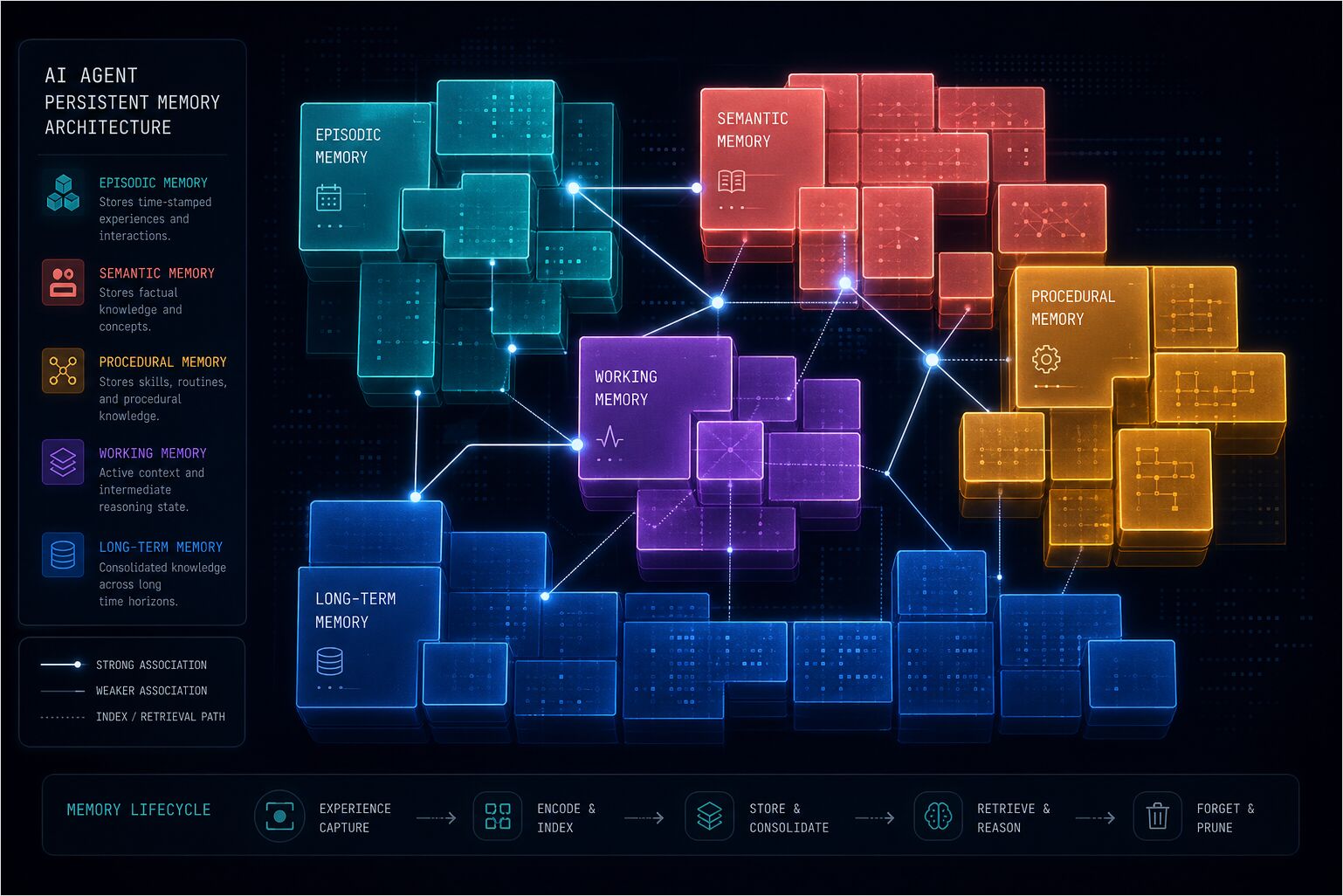
The industry has tried to solve this. LangChain added memory modules. OpenAI introduced assistants with threads. Frameworks like Letta, Zep, and Cognee built entire architectures around persistent memory. Databricks published on “memory scaling” — the idea that agent performance improves with accumulated experience. Dedicated benchmark papers, episodic memory surveys, and a rapidly growing ecosystem of tools have all emerged since 2024 to address what is increasingly recognised as one of the central unsolved problems in agentic AI.
Most of these approaches share a common problem: they treat memory as an afterthought — a database you query, a context window you stuff, a retrieval system that adds latency and noise rather than clarity.
Hermes Agent takes a fundamentally different approach. Memory isn’t something the agent retrieves when needed. It’s something the agent is at all times — built into the system prompt, curated, bounded, and always active. It’s small enough to be fast, structured enough to be useful, and disciplined enough to know what to forget.
This article explains exactly how that works — the Hermes-specific layer inside the cross-framework model in Memory Systems in AI Assistants and the wider stack in AI Assistant Architecture. For activation and inspection commands (hermes memory, hermes dump, log tailing), pair it with the Hermes Agent CLI cheat sheet. For the complementary side of Hermes “long-term knowledge”—reusable procedures in SKILL.md rather than curated memory files—see Hermes Agent Skill Authoring — SKILL.md Structure and Best Practices.
Part 1: The AI Agent Memory Problem
Why “Just Add Context” Doesn’t Scale for Agents
The obvious solution to stateless AI is to add context. Attach the previous conversation. Include the project documentation. Send the entire history.
For a while, that works. You’ve got a 128K context window. You can fit a lot of text in there.
But context isn’t memory — there’s a real and important difference between them. Context is everything you’re shown right now; memory is what you actively keep and carry forward.
Context has no curation. It’s a dump: as it grows, the model has to process thousands of tokens of irrelevant history to find the one fact it needs. That costs tokens and money, compounds latency, and eventually hits the ceiling.
Memory is curated. It’s the distillation of experience into something compact and actionable. It doesn’t grow indefinitely — it consolidates, updates, and forgets.
Human memory works the same way. You don’t remember every conversation you’ve ever had. You remember the parts that matter: who you’re talking to, what they care about, what you’ve agreed on, what you’ve learned. The rest is either forgotten or searchable when you need it.
The Research Landscape
The AI agent memory space has exploded since 2024, with dedicated benchmark suites, a growing research literature, and a measurable performance gap between different architectural approaches. Here’s where things stand.
Letta (formerly MemGPT) was one of the earliest frameworks to treat persistent memory as a first-class concern, reaching 21.7K GitHub stars. It uses an OS-inspired three-tier model: core memory (small, always in context), recall memory (searchable conversation history), and archival memory (long-term cold storage). The insight that not all memory is equal was correct. The implementation, however, requires agents to run entirely inside the Letta runtime — adopting it means adopting the whole platform, not just a memory layer.
Zep / Graphiti focuses on conversational memory with temporal entity tracking — facts carry validity windows so the graph knows when something was true. It’s strong for chatbots that need relationship graphs, less suited for autonomous agents tracking environment facts and project conventions.
Cognee is built for knowledge extraction from documents and structured data, with 30+ ingestion connectors and a knowledge graph backend. It excels at institutional knowledge and RAG pipelines but is less focused on personal agent memory. See self-hosting Cognee with local LLMs for a practical setup guide.
Hindsight does knowledge graph-based recall with entity relationships and a unique reflect synthesis tool that performs cross-memory synthesis — combining multiple memories into new insights. It’s among the top performers on agent memory benchmarks and is available as a memory provider for Hermes Agent.
Mem0 handles memory extraction server-side via LLM analysis, requiring minimal configuration. The Mem0 research paper, published at ECAI 2025 (arXiv:2504.19413), benchmarked ten distinct approaches to AI memory and validated the selective extraction approach — storing discrete facts, deduplicating, and retrieving only what’s relevant. Mem0 has grown to approximately 48K GitHub stars and supports 21 framework integrations. The trade-off is cloud dependency and cost.
Databricks’ memory scaling research introduced the concept that agent performance improves with accumulated experience. Their architecture holds system prompts, enterprise assets, and episodic/semantic memories scoped at organization and user level, validating the idea that memory quality matters as much as model capability.
The common thread across most frameworks is that they treat memory as a retrieval problem: store it somewhere, query it when needed, inject it into context. Hermes does the opposite — memory isn’t retrieved on demand, it’s injected at session start and always present. Always active, always available, curated enough to stay useful.
Part 2: Architecture
Read this part top-down — layers and per-turn recall/store first, then what lives in MEMORY.md and USER.md, then how to attach an external provider.
Two layers
Hermes stacks memory in two layers:
- Built-in —
MEMORY.mdandUSER.md, file-backed, always active. Hard caps of 2,200 characters (agent notes) and 1,375 characters (user profile). - One external provider (optional) — Honcho, OpenViking, Mem0, Hindsight, Holographic, RetainDB, ByteRover, Supermemory, and peers you enable via config. Only one external backend runs at a time. It adds retrieval and retention beside the files; it does not replace them.
The mental model is additive — frozen core files plus at most one plugin. Prefetch and sync hooks orchestrate the external layer; the two files stay injected separately as part of the frozen system prompt.
Runtime flow (prefetch and sync)
Recall happens before the model answers; persistence happens after the assistant message. In Hermes Agent’s memory manager this maps to prefetch on the way in and sync on the way out. Names below match the implementation surface (MemoryManager, per-provider prefetch / sync_turn / queue_prefetch).
User message
    |
    v
MemoryManager.prefetch_all(query)        <-- recall phase
    |
    +-- provider.prefetch(query)        <-- each external provider searches its store
    |
    v
Context injected into LLM turn
    |
    v
LLM responds (assistant message)
    |
    v
MemoryManager.sync_all(user, assistant)  <-- store phase
    |
    +-- provider.sync_turn(user, assistant)
    +-- provider.queue_prefetch(user)    <-- background search toward the next turn
Built-in MEMORY.md and USER.md are not fetched through prefetch_all — they are already part of the frozen system prompt. External backends plug into prefetch_all / sync_all; queue_prefetch lets a provider warm retrieval for the following turn without blocking the current reply.
Three paths into long-term memory
-
Built-in
memorytool. The model callsmemorywithadd,replace, orremovewhen instructions say something should persist — durable facts, preferences, corrections, environment notes.target='user'maintains USER.md;target='memory'maintains MEMORY.md. Example shape:memory(action='add', target='user', content='…'). -
Passive retention on external providers. Each turn the framework invokes the provider’s sync path so conversation can be chunked, summarized, or extracted without the model naming every fact. Behaviour differs by backend — for example Hindsight batches turns and runs structured retention with entities and relationships; Honcho sends dialogue through its dialectic pipeline; Mem0- and Supermemory-style stacks extract facts passively from turns.
-
Provider-specific tools. When the plugin exposes them, explicit writes such as
honcho_conclude,hindsight_retain, orhoncho_profilestore durable slices on demand.
Automatic recall versus provider tools
Core memory does not need a read tool — it is already in the prompt. External backends add either automatic injection from prefetch (no separate recall tool call for that slice of context) or explicit retrieval tools (honcho_search, honcho_reasoning, honcho_context, hindsight_recall, hindsight_reflect, and peers) when the model needs a sharper query than prefetch alone.
Recall modes (external providers)
Plugins support a configurable recall mode (typically recall_mode next to memory.provider in config) that trades tokens for control.
| Mode | Auto-inject from prefetch | Provider tools available | Typical fit |
|---|---|---|---|
| context | Yes | No | Hands-off, predictable context |
| tools | No | Yes | Model chooses when to retrieve |
| hybrid | Yes | Yes | Richest context; higher token use |
When no external provider is set (memory.provider empty or unset), only the built-in files and session search apply — no prefetch/sync from a plugin.
Paths on disk and budgets
Hermes Agent’s built-in memory lives in two files.
~/.hermes/memories/MEMORY.md— Agent’s personal notes (2,200 chars, ~800 tokens)~/.hermes/memories/USER.md— User profile (1,375 chars, ~500 tokens)
That’s the entire persistent memory surface: two files, under 3,600 characters total, fewer than 1,300 tokens. It looks deliberately small because it is — and that’s exactly the design intent.
MEMORY.md: The Agent’s Notes
This is where the agent stores everything it learns about its environment, the project, tools, conventions, and lessons learned. Here’s what it looks like:
User's project is a Go microservice at ~/code/gateway using gRPC + PostgreSQL
This machine runs Ubuntu 22.04, has Docker and kubectl installed
User prefers snake_case for variable names and avoids camelCase
These aren’t logs. They’re facts. Dense, declarative, information-packed. No timestamps, no fluff, no “on January 5th the user asked me to…”
USER.md: The User Profile
This is where the agent stores everything it knows about you.
User is a full-stack developer comfortable with TypeScript, Go, and Python.
User prefers snake_case for variable names and avoids camelCase.
User primarily uses Linux Ubuntu 22.04.
User deploys to AWS using Terraform.
Identity, role, preferences, technical skills, communication style, pet peeves. The stuff that makes the agent respond differently to you than to anyone else.
The Frozen Snapshot Pattern
At session start, both files are loaded from disk and injected as a frozen block into the system prompt. Here’s what it looks like:
══════════════════════════════════════════════
MEMORY (your personal notes) [7% — 166/2,200 chars]
══════════════════════════════════════════════
User's project is a Go microservice at ~/code/gateway using gRPC + PostgreSQL
§
This machine runs Ubuntu 22.04, has Docker and kubectl installed
§
User prefers snake_case for variable names and avoids camelCase
§
══════════════════════════════════════════════
USER PROFILE (who the user is) [8% — 110/1,375 chars]
══════════════════════════════════════════════
User is a full-stack developer comfortable with TypeScript, Go, and Python.
§
User prefers snake_case for variable names and avoids camelCase.
§
The format uses headers, usage percentages, character counts, and § (section sign) delimiters. Entries can be multiline. It’s designed to be parseable by the model while remaining human-readable.
Why frozen? Prefix caching. The system prompt is the same across every turn in a session. By keeping memory static after session start, the model can cache the prefix computation and only process the variable parts — the conversation. This is a significant performance optimization. You’re not re-computing attention over the same memory tokens on every turn.
Changes made during a session persist to disk immediately, but they only appear in the system prompt at the next session start. Tool responses always show the live state, but the model’s “mind” doesn’t change mid-session. This prevents the model from chasing its own tail — updating memory and then reacting to its own update in the same conversation.
Character Limits as a Feature
2,200 characters. 1,375 characters. These aren’t arbitrary limits. They’re design constraints that force curation.
Unlimited memory is a liability. It encourages dumping everything in, never consolidating, and eventually becoming noise. Bounded memory forces the agent to be selective. What’s actually important? What will I need again? What can be compressed without losing meaning?
When memory is full, the agent doesn’t just fail silently. It gets an error with current entries and usage, then follows a workflow:
- Read current entries from error response
- Identify removable or consolidatable entries
- Use
replaceto merge related entries into shorter versions - Add the new entry
This is how memory stays useful. It’s not a database. It’s a curated collection of facts that matter.
Security: Prompt Injection Scanning
Every memory entry is scanned before acceptance. The system blocks prompt injection attempts, credential exfiltration, SSH backdoors, and invisible Unicode characters.
Memory is also deduplicated. Exact duplicate entries are rejected automatically. This prevents adversaries from trying to inject malicious content through repeated submissions.
External memory providers (activation and links)
Beyond built-in MEMORY.md and USER.md, Hermes Agent can attach one external memory plugin at a time — Honcho, OpenViking, Mem0, Hindsight, Holographic, RetainDB, ByteRover, or Supermemory — for persistent, cross-session knowledge. Only one external provider is active at once; the two core files remain loaded alongside it (additive, not replacement).
Activate and inspect providers with hermes memory setup, hermes memory status, and hermes memory off, or set memory.provider and recall_mode in ~/.hermes/config.yaml. Credential patterns vary (for example HINDSIGHT_API_KEY, Honcho keys under $HERMES_HOME/honcho.json); use hermes memory setup for interactive wiring.
Minimal built-in-only YAML shape:
memory:
  provider: ""
  memory_enabled: true
  user_profile_enabled: true
Example activation for one backend (swap hindsight for honcho, mem0, supermemory, or others your install supports):
memory:
  provider: "hindsight"
For the full comparison table, LLM and embedding dependency notes, per-provider breakdowns, and how these backends relate to OpenClaw and other stacks, see Agent memory providers compared. For a local, self-hosted provider with unusually granular write controls, see Mnemosyne for Hermes Agent: Local Memory Quickstart — and Self-Reinforcing Memory Loops in AI Agents for why bounded, curated memory like Hermes’ own MEMORY.md sidesteps several feedback-loop failure modes by construction.
For profile-specific wiring and production workflows, see Hermes Agent production setup. The AI Systems Memory hub lists this guide plus related Cognee and knowledge-layer articles.
Part 3: When Memory Fires — Triggers & Decisions
The most common question about Hermes Agent’s memory is when it actually saves something.
The answer is: constantly, but selectively. The agent manages its own memory via the memory tool, and the decision to save is driven by a combination of explicit signals and implicit patterns.
Writing Triggers: When Does the Agent Decide to Save?
The agent saves memory proactively. It doesn’t wait for you to ask. Here’s what triggers it.
User corrections. When you correct the agent, that’s a signal to remember. “Don’t do that again.” “Use this instead.” “Remember this.” These are explicit instructions to update memory.
Example: you ask the agent to configure a Python environment. It suggests pip. You say “I use poetry for everything.” The agent saves: User prefers using the 'poetry' package manager for all Python projects.
Discovered preferences. The agent observes patterns and infers preferences. If you consistently use a certain tool, framework, or workflow, it gets saved.
Example: after seeing you use poetry multiple times across different projects, the agent saves it as a preference.
Environment facts. Things about the machine, the project, the tools installed. These are discovered through exploration and saved as facts.
Example: the agent checks what’s installed and saves: This machine runs Ubuntu 22.04, has Docker and kubectl installed.
Project conventions. How the project is structured, what tools it uses, what patterns it follows. These are discovered through code inspection and saved.
Example: User's project is a Go microservice at ~/code/gateway using gRPC + PostgreSQL.
Completed complex workflows. After completing a task that took 5+ tool calls, the agent considers saving the approach as a skill or at least noting what worked.
Tool quirks and workarounds. When the agent discovers something non-obvious about a tool, API, or system — a limitation, a workaround, a convention — it saves it.
What gets skipped:
- Trivial or obvious information
- Things easily re-discovered
- Raw data dumps
- Session-specific ephemera
- Information already in context files (SOUL.md, AGENTS.md)
Reading Triggers: When Does the Agent Recall?
Memory isn’t retrieved — it’s always there. But there are different levels of access.
Session start (automatic). MEMORY.md and USER.md are injected into the system prompt. The agent has them from the first token. No query needed, no latency, no tool call. This is the core memory — always active.
session_search (on-demand). When the agent needs to find something from past conversations that isn’t in core memory, it uses the session_search tool. This queries SQLite (~/.hermes/state.db) with FTS5 full-text search and Gemini Flash summarization. Use this when the question sounds like “we talked about this before” rather than “remember this fact forever.”
Example: you ask “Did we discuss Docker networking last week?” The agent searches session history and returns a summary of the relevant conversation.
External provider tools (when configured). When an external memory provider is active, the framework also runs an automatic prefetch step before each reply (see Part 2). Additional tools such as honcho_search, hindsight_recall, or mem0_search are for targeted lookups when the agent chooses explicit retrieval — depending on recall_mode, automatic injection, tools, or both may be active.
The Decision Tree
Here’s how the agent weighs “is this worth remembering?”:
Is this a correction or explicit instruction?
  YES → Save to memory
  NO → Is this a preference or pattern?
    YES → Save to user profile
    NO → Is this an environment fact or convention?
      YES → Save to memory
      NO → Is this easily re-discovered?
        YES → Skip
        NO → Is this session-specific?
          YES → Skip
          NO → Save to memory
The agent doesn’t overthink this. It saves proactively, consolidates when full, and trusts the character limits to keep things tight.
Part 4: Internal Memory vs. External Knowledge Bases
This is where confusion often happens. Hermes Agent has internal memory (MEMORY.md, USER.md, external providers) and external knowledge bases (LLM Wiki, Obsidian, Notion, ArXiv, filesystem), and they serve completely different roles. This is similar to the distinction between retrieval-augmented generation pipelines and agent working memory — external retrieval is good for deep knowledge lookups, not for carrying identity and preferences. Internal memory is the agent’s brain — always active, curated, carried into every session. External knowledge bases are its library — vast reference resources consulted on demand.
The Distinction
Internal Memory (the brain):
- Small, persistent, injected into system prompt
- Contains: user preferences, agent conventions, immediate lessons
- Always “in mind” during conversation
- Curated, bounded, actively managed
- Examples: MEMORY.md, USER.md, Honcho, Hindsight, Mem0
External Knowledge Bases (the library):
- Vast, reference-only, accessed on-demand
- Contains: documents, papers, code, notes, databases
- Accessed via tools when needed
- Not “remembered” — looked up
- Examples: LLM Wiki, Obsidian, Notion, ArXiv, filesystem, GitHub
How They Relate
The agent accesses external bases via tools when needed. It doesn’t “remember” them — it looks them up.
LLM Wiki (llm-wiki): Karpathy’s interlinked Markdown knowledge base for building and querying domain knowledge. The agent uses the llm-wiki skill to read, search, and query it. It’s a reference resource, not memory.
Obsidian: Personal note vaults with bidirectional links. The agent uses the obsidian skill to read, search, and create notes. Obsidian is part of the broader personal knowledge management ecosystem that Hermes can tap into as a library resource.
Notion/Airtable: Structured databases and wikis accessed via API. The agent queries them when needed.
ArXiv: Academic paper repositories. The agent searches and extracts papers when researching a topic.
Filesystem: Project code, documentation, configurations. The agent reads files when working on a project.
The Distillation Pattern
Here’s the key insight: critical insights from external bases can be distilled into internal memory.
Example: the agent reads a paper from ArXiv about memory scaling for AI agents. It doesn’t save the entire paper to memory. It saves the key takeaway: Memory scaling: agent performance improves with accumulated experience through user interaction and business context stored in memory.
The external resource is vast. The internal memory is the distillation.
When to Use Which
Internal memory for:
- “Who am I helping?”
- “What do they prefer?”
- “What did we just learn?”
- “What’s the project setup?”
- “What tools are available?”
External knowledge bases for:
- “What’s the latest research on X?”
- “What’s in my project’s documentation?”
- “What did we discuss last month?”
- “What’s the API for this service?”
- “What’s the code structure?”
The agent understands the difference and uses each appropriately — it doesn’t conflate looking up a document with recalling something it has learned about you and your environment.
Part 5: How It Actually Works
Let’s look at the mechanics.
The memory Tool
The agent manages memory through a single tool with three actions: add, replace, remove.
There is no read action — memory content is auto-injected into the system prompt. The agent doesn’t need to read it because it’s always there.
add — Adds a new entry.
memory(action="add", target="memory",
       content="User runs macOS 14 Sonoma, uses Homebrew, has Docker Desktop installed.")
replace — Replaces an existing entry using substring matching.
memory(action="replace", target="memory",
       old_text="dark mode",
       content="User prefers light mode in VS Code, dark mode in terminal")
remove — Removes an entry using substring matching.
memory(action="remove", target="memory",
       old_text="temporary project fact")
Substring Matching
replace and remove use short unique substrings via old_text. You don’t need the full entry text. This makes surgical edits possible without knowing the exact content.
If a substring matches multiple entries, an error is returned requesting a more specific match. The agent then refines its query.
Target Stores: memory vs user
The target parameter determines which file gets updated.
memory— Agent’s personal notes. Environment facts, project conventions, tool quirks, lessons learned.user— User profile. Identity, role, timezone, communication preferences, pet peeves, workflow habits.
Capacity Management
When memory is >80% full, the agent consolidates. It merges related entries, removes outdated facts, and compresses information.
Good memory entries are compact and information-dense:
User runs macOS 14 Sonoma, uses Homebrew, has Docker Desktop installed. Shell: zsh with oh-my-zsh. Editor: Neovim with Telescope plugin.
Bad memory entries are vague or verbose:
User has a project.
On January 5th, 2026, the user asked me to look at their project which is located at ~/code/gateway and it uses Go with gRPC and PostgreSQL for the database layer.
The first is dense and useful. The second is either too vague or too verbose.
Session Search vs Persistent Memory
session_search and persistent memory serve different purposes.
| Feature | Persistent Memory | Session Search |
|---|---|---|
| Capacity | ~1,300 tokens total | Unlimited (all sessions) |
| Speed | Instant (in system prompt) | Requires search + LLM summarization |
| Use Case | Key facts always available | Finding specific past conversations |
| Management | Manually curated by agent | Automatic — all sessions stored |
| Token Cost | Fixed per session (~1,300 tokens) | On-demand (searched when needed) |
Rule of thumb: use memory for critical facts that should always be in context. Use session search for historical lookups.
Part 6: The Philosophy
Why Bounded Memory Beats Unlimited Memory
The instinct is to make memory as large as possible. Store everything. Retrieve what you need.
Bounded memory works better. Here’s why.
Curation forces quality. When you have limited space, you only save what matters. You compress, consolidate, and prioritize. Unlimited memory encourages dumping everything in and never cleaning up.
Speed matters. 1,300 tokens in the system prompt is fast. 100,000 tokens retrieved from a database is slow. Memory should be instant, not a query.
Noise degrades performance. More memory isn’t better memory. It’s noisier memory. The model has to distinguish signal from noise, and that takes attention — attention that should be spent on the actual task.
Forgetting is a feature. Human memory forgets. That’s not a bug — it’s how we prioritize. Agents should forget too. Not everything deserves to be remembered.
The “Forgetting” Problem
Agents need to unlearn. Not just forget, but actively remove outdated information.
Here’s how Hermes Agent handles it:
removeaction: Delete entries that are no longer relevant.replaceaction: Update entries with new information.- Capacity pressure: When memory is full, the agent consolidates and removes old entries.
- Security scanning: Blocks malicious or corrupted entries.
Forgetting isn’t failure — it’s maintenance. An agent that can’t unlearn will eventually carry as much noise as signal.
Memory Scaling
Databricks introduced the concept of “memory scaling”: does an agent with thousands of users perform better than one with a single user?
Their research suggests yes, but with caveats. Memory scaling requires:
- Quality extraction: Not all interactions are worth remembering. The agent must extract insights, not logs.
- Effective retrieval: Retrieved memories must be relevant. Noise degrades performance.
- Generalization: Memories should be patterns, not specifics. “User prefers Python” scales. “User ran command X at timestamp Y” does not.
Hermes Agent’s bounded memory naturally supports memory scaling. By forcing curation, it ensures that memories are generalizable, compact, and useful.
What This Means for the Future
Memory is becoming the competitive moat in agentic AI — not the model itself, but what the model carries between sessions. Two agents with identical underlying models can perform very differently: one remembers your preferences, your environment, and your past mistakes; the other starts cold every time.
The question is no longer whether agents should have persistent memory. It’s settled: they must. The open question is how to design that memory well — what to keep, what to discard, how to make it instant, and how to prevent it from becoming noise.
Hermes Agent’s answer is to keep memory small, curated, and always active — not a database you query, but a working model of the user that the agent carries with it into every conversation.
Conclusion
Hermes Agent’s memory system is deliberately simple: two files, firm character limits, no retrieval pipeline, no vector database, and no per-query latency. What sounds like a constraint is the whole point.
It works because it treats memory the way a brain works rather than the way a database does — small, curated, and always active. The agent doesn’t retrieve memory when it needs it; the memory is simply always there, woven into the system prompt from the first token of every session.
External memory providers extend this system for users who need more: knowledge graphs, multi-agent support, self-hosted storage, enterprise features. But the core remains the same: bounded, curated, always available.
And external knowledge bases — LLM Wiki, Obsidian, Notion, ArXiv — serve a different role. They’re the library, not the brain. The agent looks them up, doesn’t remember them. Critical insights get distilled into internal memory; the rest stays in the library.
This is how an AI agent remembers you. Not by storing everything, but by remembering what matters.
Hermes Agent was released by Nous Research in February 2026 and reached over 64,000 GitHub stars by April 2026 (v0.9.0), with 242+ contributors. It is open-source and available at github.com/NousResearch/hermes-agent. For install, configuration, and workflow guides, see the Hermes Agent overview.
