
Hindsight for Hermes Agent: Self-Hosted Memory with Local LLMs
Persistent Hermes memory on your own hardware.
A self-hosted AI agent needs more than a long context window. It needs a way to retain useful facts, retrieve earlier decisions, and revise what it thinks it knows as projects evolve.
Hermes Agent ships with built-in memory files, but an external provider can provide much richer retrieval across sessions. Hindsight is one of the more interesting options in that space. This guide installs it for Hermes with no cloud inference, first as an all-in-one Docker container and then against an existing PostgreSQL server with separate local model endpoints.

The guide also covers local embeddings and reranking with Qwen3 models on Ollama or llama.cpp, the generative LLM tiers each Hindsight operation needs, and command-level checks for validating the whole stack. The examples use a deliberate port scheme — 8080 for the main llama.cpp server, 8081 for embeddings, 8082 for reranking, 11434 for Ollama — so change them to the ports you already use and keep the small servers off the main model’s port.
What Hindsight Does
Hindsight is a persistent agent memory engine with three principal operations: retain, recall, and reflect. Retain extracts and stores information; recall combines semantic, keyword, graph, and temporal retrieval; reflect synthesizes an answer from accumulated memories. Background consolidation can turn overlapping observations into a more useful knowledge layer.
It is not just an embeddings database. A vector store can locate similar passages, but a memory system also has to preserve chronology, project boundaries, contradictory evidence, and changes in decisions. Those failure modes are explored in self-reinforcing memory loops.
For the wider market, see agent memory providers compared. Hermes’ built-in MEMORY.md, USER.md, and memory modes are covered in the Hermes Agent memory system guide, so this article assumes you know how the built-in layer works.
Why Move Beyond Mnemosyne
Mnemosyne for Hermes offers appealing local-first ideas, including SQLite storage and hybrid retrieval. In practice, installation constraints, version compatibility, write-approval behaviour, and rapid changes around its 4.0 prereleases can make it difficult to operate predictably. Those are operational concerns, not evidence that Mnemosyne’s memory model is fundamentally flawed.
Hindsight is not dependency-free either: its Docker image and local models can consume substantial disk space. Running its API as an independent service, with inference elsewhere, keeps upgrades and troubleshooting isolated from the agent itself.
Choose a Deployment
| Component | A: All-in-one container | B: Existing PostgreSQL server |
|---|---|---|
| Hindsight API and UI | Docker container | Docker container |
| PostgreSQL | Embedded pg0 in container |
Existing PostgreSQL machine |
| Generative LLM | External llama.cpp | External llama.cpp |
| Embeddings | Default local or external | External Ollama or llama.cpp |
| Reranking | Default local or external | External rerank server |
| Best for | Quick evaluation | Long-running, isolated installation |
Here, “all-in-one” means the Hindsight API, UI, and database are in one container; the inference LLM is still hosted elsewhere. This is intentional: Docker’s official Hindsight image does not bundle a ready-to-use local generative llama.cpp server.
Use LAN-reachable addresses, not localhost, for services running on a different host. Restrict these ports to trusted clients; the example dummy keys are compatibility placeholders, not authentication.
Option A: All-in-One Hindsight Container
This is the simplest way to evaluate Hindsight without filling the Hermes VM with Python, Torch, and local model dependencies. The container runs Hindsight and embedded PostgreSQL, while your main llama.cpp LLM handles memory extraction and reflection.
Two image tags matter here. ghcr.io/vectorize-io/hindsight:latest is the large image — roughly 9 GB on AMD64 — because it bundles a BGE embedder, a MiniLM reranker, and embedded PostgreSQL. latest-slim is roughly 500 MB and expects those two models to live elsewhere, which is what you want once you point Hindsight at the Qwen3 services below. Once the health check passes, pin a specific tag: a moving tag is a poor match for a database you intend to keep.
Create a directory and a Compose file on the Hindsight host:
mkdir -p ~/services/hindsight
cd ~/services/hindsight
cat > compose.yaml <<'YAML'
services:
  hindsight:
    image: ghcr.io/vectorize-io/hindsight:latest
    container_name: hindsight
    restart: unless-stopped
    shm_size: 1gb
    extra_hosts:
      - "host.docker.internal:host-gateway"
    ports:
      - "8888:8888"  # Memory API
      - "9999:9999"  # Control-plane UI
    environment:
      HINDSIGHT_API_WORKER_ID: hindsight-standalone
      HINDSIGHT_API_LLM_PROVIDER: openai
      HINDSIGHT_API_LLM_BASE_URL: http://WORKSTATION_IP:8080/v1
      HINDSIGHT_API_LLM_MODEL: LocalMegaLLM
      HINDSIGHT_API_LLM_API_KEY: dummy
      HINDSIGHT_API_LLM_MAX_CONCURRENT: "2"
    volumes:
      - hindsight-pg0:/home/hindsight/.pg0
volumes:
  hindsight-pg0:
YAML
Replace WORKSTATION_IP with the host running llama.cpp. On Linux, host.docker.internal resolves only if the container declares the host-gateway mapping shown above; without it, a base URL of http://host.docker.internal:8080/v1 points nowhere. The 1 GB shared-memory reservation is particularly useful for embedded PostgreSQL indexing; Docker’s small default /dev/shm can cause failures. A named volume preserves the database when the container is recreated, and a bind mount alternative has to be owned by uid 1000, the user inside the image.
HINDSIGHT_API_WORKER_ID should stay stable across recreations — Docker’s default is the container hostname, and a task that was mid-flight when a container died stays stuck under the old worker id.
docker compose up -d
docker compose logs -f --tail=100
curl -f http://localhost:8888/health
If your installed Hindsight version exposes health at a different path, inspect http://localhost:8888/docs and the container logs. The control plane is normally available at http://HINDSIGHT_HOST:9999. Once the basic deployment works, you can also point its embedding and reranking providers at the services described below rather than loading the default models inside the container.
Do not expose ports 8888 or 9999 directly to the internet. Use a private network or an authenticated reverse proxy. Embedded PostgreSQL is convenient for testing, but an externally managed database is easier to back up and maintain.
Option B: Hindsight Against an Existing PostgreSQL Server
For a long-running installation, I prefer keeping the Hindsight API, database, and inference endpoints separate. The Hindsight VM can remain small because it runs orchestration and HTTP services rather than heavy models.
Prepare PostgreSQL and pgvector
Hindsight needs PostgreSQL 14 or newer and a vector extension in the hindsight database. The extension is per database: installing the package on the server does nothing until CREATE EXTENSION runs there. On a Debian or Ubuntu PostgreSQL server, install the pgvector package matching the actual PostgreSQL major version; for example, on PostgreSQL 16:
sudo apt update
sudo apt install postgresql-16-pgvector
The package name and availability depend on your configured apt repositories. If it is not available, follow the pgvector installation instructions, or install a compatible package from the PostgreSQL PGDG repository. Do not blindly change the PostgreSQL major version on a shared server.
Create a dedicated role and database as a PostgreSQL administrator:
CREATE ROLE hindsight LOGIN PASSWORD 'REPLACE_WITH_LONG_PASSWORD';
CREATE DATABASE hindsight OWNER hindsight;
Connect to the new database and enable the extension:
sudo -u postgres psql -d hindsight -c \
  'CREATE EXTENSION IF NOT EXISTS vector;'
sudo -u postgres psql -d hindsight -c \
  "SELECT extname, extversion FROM pg_extension WHERE extname = 'vector';"
The extension normally needs elevated privileges to install; the application role does not need to be a superuser. Hindsight uses pgvector by default and wants 0.8.0 or newer for iterative ANN scans; older servers reject that setting. HINDSIGHT_API_VECTOR_EXTENSION can alternatively select pgvectorscale (a DiskANN option Hindsight documents for very large banks) or vchord, both of which need extra packaging on this exact PostgreSQL build. Switching algorithms after memories exist stops startup and asks for a migration, so choose before the first retain. For a personal Hermes bank, pgvector is the one to install and then stop.
Allow only the Hindsight host through pg_hba.conf, for example:
host hindsight hindsight 192.168.1.50/32 scram-sha-256
Set PostgreSQL listen_addresses appropriately and use TLS or a trusted private network for cross-host connections. Back up this database independently of the Hindsight Docker container. If the server is shared with other applications, keep Hindsight in its own database, or set HINDSIGHT_API_DATABASE_SCHEMA to a schema you own; the default schema is public.
Run Hindsight Against PostgreSQL
Create compose.yaml on the Hindsight VM. This version deliberately does not start PostgreSQL locally:
services:
  hindsight:
    image: ghcr.io/vectorize-io/hindsight:latest-slim
    restart: unless-stopped
    ports:
      - "8888:8888"
      - "9999:9999"
    env_file: .env
    environment:
      HINDSIGHT_API_LLM_PROVIDER: openai
      HINDSIGHT_API_LLM_BASE_URL: http://WORKSTATION_IP:8080/v1
      HINDSIGHT_API_LLM_MODEL: LocalMegaLLM
      HINDSIGHT_API_LLM_API_KEY: dummy
      HINDSIGHT_API_LLM_MAX_CONCURRENT: "2"
      HINDSIGHT_API_DB_POOL_MIN_SIZE: "2"
      HINDSIGHT_API_DB_POOL_MAX_SIZE: "10"
      HINDSIGHT_API_WORKER_ID: hindsight-standalone
Store the external database URL in a file called .env:
HINDSIGHT_API_DATABASE_URL=postgresql://hindsight:YOUR_PASSWORD@POSTGRES_IP:5432/hindsight
chmod 600 .env
docker compose up -d
docker compose logs -f --tail=100
If your password contains @, :, /, or other reserved URL characters, URL-encode it before putting it in the connection string. Test that the Hindsight VM can reach PostgreSQL port 5432, and that pg_hba.conf allows the Hindsight host — a server bound only to 127.0.0.1 refuses the connection even when the URL looks right. Allow the first startup to run database migrations; migrations run on startup unless you set HINDSIGHT_API_RUN_MIGRATIONS_ON_STARTUP=false.
Choose External Embeddings: Ollama or llama.cpp
Hindsight can query a separate OpenAI-compatible embeddings endpoint. Two practical options are Ollama, which handles model acquisition and serving with little configuration, and llama.cpp, which gives precise control over GGUF quantization, CPU threads, device placement, and batching. Model background and benchmarks for both Qwen3 models are in Qwen3 Embedding and Reranker models on Ollama.
Qwen3-Embedding-0.6B returns 1024-dimensional vectors, and Hindsight reads that width on startup and sizes the database to match. A bank created with the bundled 384-dimensional BGE model cannot take this model — start from an empty database or volume, and decide the embedding model before the first retain. An embeddings provider switch later requires re-embedding stored records even if both models use the same dimensionality.
Option 1: Ollama for Qwen3-Embedding-0.6B
Install Ollama on the inference host using its official Linux installation documentation, then start the embedding model:
ollama pull qwen3-embedding:0.6b
ollama serve
For remote access, configure Ollama’s OLLAMA_HOST=0.0.0.0:11434 in its service environment, restart the service, and firewall it to the Hindsight VM — the procedure is covered in Ollama remote access. A daemon bound only to 127.0.0.1 is invisible to the Hindsight container. First check the model name with ollama list, and test the standard embedding endpoint:
curl http://EMBED_HOST:11434/api/embed \
  -H 'Content-Type: application/json' \
  -d '{"model":"qwen3-embedding:0.6b","input":"A test memory"}'
Hindsight’s OpenAI embeddings provider instead calls Ollama’s OpenAI-compatible /v1/embeddings endpoint. Verify that endpoint works with your Ollama version before configuring Hindsight. Ollama is straightforward for embeddings; do not assume its API offers a compatible reranking endpoint. For reranking, use the separate llama.cpp service below or a dedicated TEI server.
Option 2: llama.cpp for Qwen3-Embedding-0.6B
Download a verified Qwen3-Embedding-0.6B GGUF conversion. Use the GGUF filename you actually downloaded:
#!/bin/sh
# start-embedding.sh - CPU-only embedding server
set -eu
cd "$HOME/prj"
exec ./llama.cpp/llama-server \
  --host 0.0.0.0 --port 8081 \
  --model "$HOME/ggufs/Qwen3-Embedding-0.6B-Q8_0.gguf" \
  --alias qwen3-embedding-0.6b \
  --embedding --pooling last \
  --ctx-size 4096 --parallel 1 \
  --threads 4 --threads-batch 4 \
  --batch-size 512 --ubatch-size 256 \
  --n-gpu-layers 0
Qwen3 embeddings use last-token pooling, unlike the CLS pooling used by some BGE models. A CPU-only llama.cpp build is preferable if you want absolutely no CUDA initialization on a workstation whose GPU is occupied by a large conversational model. Do not enable --reranking on this embedding server: that combination is a known way to get a vector of zeros.
curl -s http://EMBED_HOST:8081/v1/embeddings \
  -H 'Content-Type: application/json' \
  -d '{"model":"qwen3-embedding-0.6b","input":"A test memory"}' \
  | jq '.data[0].embedding | length'
A full-dimension Qwen3-Embedding-0.6B output should contain 1024 floats. Check that the GGUF conversion and your Hindsight query/document instruction handling are compatible; instruction-sensitive embedding models can lose accuracy when prompted incorrectly.
Run Qwen3-Reranker-0.6B in llama.cpp
Reranking is different from embeddings: a cross-encoder evaluates each query/document pair and returns a relevance score. Qwen3-Reranker-0.6B can be served through llama.cpp using a GGUF conversion designed for ranking; the official reranker weights are published as GGUF, and a conversion built with an old convert_hf_to_gguf.py that dropped the ranking head scores every passage near zero.
#!/bin/sh
# start-reranker.sh - GPU or CPU as selected by --n-gpu-layers
set -eu
cd "$HOME/prj"
exec ./llama.cpp/llama-server \
  --host 0.0.0.0 --port 8082 \
  --model "$HOME/ggufs/Qwen3-Reranker-0.6B-Q8_0.gguf" \
  --alias qwen3-reranker-0.6b \
  --embedding --reranking --pooling rank \
  --ctx-size 4096 --parallel 1 \
  --batch-size 512 --ubatch-size 256 \
  --n-gpu-layers 99
Set --n-gpu-layers 0 to run it on CPU. The GPU version needs additional VRAM for compute buffers and context, not just model weights; avoid assuming that the file size is the total GPU allocation.
curl -s http://RERANK_HOST:8082/v1/rerank \
  -H 'Content-Type: application/json' \
  -d '{"model":"qwen3-reranker-0.6b", "query":"PostgreSQL storage", "documents":["Hindsight stores memories in PostgreSQL.","A recipe for bread."], "top_n":2}' \
  | jq
The PostgreSQL document should rank above the unrelated document; all-zero relevance scores mean the GGUF is the wrong conversion, and recall will look random even when the facts are stored. Check the exact results[].index and results[].relevance_score shape: Hindsight expects a Cohere-compatible rerank response, and llama.cpp compatibility can vary across builds.
Wire Both Endpoints Into Hindsight
Add the following environment settings to the Hindsight Compose service, or store them in its .env file. Use the Ollama base URL on port 11434 for embeddings or the llama.cpp base URL on port 8081; never both at once.
# Option: llama.cpp embedding service
HINDSIGHT_API_EMBEDDINGS_PROVIDER=openai
HINDSIGHT_API_EMBEDDINGS_OPENAI_BASE_URL=http://EMBED_HOST:8081/v1
HINDSIGHT_API_EMBEDDINGS_OPENAI_MODEL=qwen3-embedding-0.6b
HINDSIGHT_API_EMBEDDINGS_OPENAI_API_KEY=dummy
HINDSIGHT_API_EMBEDDINGS_OPENAI_BATCH_SIZE=8

# If using Ollama instead, use:
# HINDSIGHT_API_EMBEDDINGS_OPENAI_BASE_URL=http://EMBED_HOST:11434/v1
# HINDSIGHT_API_EMBEDDINGS_OPENAI_MODEL=qwen3-embedding:0.6b

# llama.cpp Cohere-compatible rerank endpoint
HINDSIGHT_API_RERANKER_PROVIDER=cohere
HINDSIGHT_API_RERANKER_COHERE_BASE_URL=http://RERANK_HOST:8082/v1/rerank
HINDSIGHT_API_RERANKER_COHERE_MODEL=qwen3-reranker-0.6b
HINDSIGHT_API_RERANKER_COHERE_API_KEY=dummy
HINDSIGHT_API_RERANKER_MAX_CANDIDATES=30
The variable names are provider-specific, and a near-miss is silent: HINDSIGHT_API_EMBEDDINGS_BASE_URL is the wrong key, and Hindsight quietly aims at OpenAI’s own embedding endpoint instead of your local server. Use HINDSIGHT_API_EMBEDDINGS_OPENAI_BASE_URL. With the reranker, Hindsight posts the full Cohere-style body to HINDSIGHT_API_RERANKER_COHERE_BASE_URL; if the container log shows a 404 for /v1/rerank/rerank, your build appends /rerank on its own and the value should stop at /v1.
For Qwen3 embeddings, test query-to-passage retrieval on your actual memories, including any recommended query instructions. Hindsight’s local embedder applies Qwen’s search instruction itself; an OpenAI-compatible server sends the string it is given, so Hindsight sends plain text unless you set a query prefix — the stored side wants the raw fact and the query side wants the instruction:
# Real newline before Query:. Bash $'...' is the reliable way to pass it.
export HINDSIGHT_API_EMBEDDINGS_QUERY_PREFIX=$'Instruct: Given a web search query, retrieve relevant passages that answer the query\nQuery:'
export HINDSIGHT_API_EMBEDDINGS_PASSAGE_PREFIX=
Set the prefixes before the first retain: changing them later means old vectors and new queries no longer sit in the same space. A server that already wraps inputs in Qwen’s template should keep both prefixes empty, or the instruction is applied twice.
Which Generative LLM Does Hindsight Need?
Embedding and reranking models are not substitutes for the generative LLM used to extract and reason over memories. Hindsight supports a default LLM and operation-specific overrides, which can target the same llama.cpp server or independent endpoints.
| Hindsight operation | Purpose | Practical model tier | Qwen examples |
|---|---|---|---|
| Retain | Extract facts, entities, decisions, and chronology | 4B minimum for tests; 9B preferred | Qwen3.5-4B / Qwen3.5-9B |
| Recall | Semantic, keyword, graph and temporal retrieval | No generative LLM required | Qwen3-Embedding-0.6B + reranker |
| Reflect | Answer questions by synthesizing retrieved memories | 9B to 27B+ | Qwen3.5-9B / Qwen3.8-27B |
| Consolidation | Reconcile and compress related facts | 9B preferred | Qwen3.5-9B / Qwen3.8-27B |
| Mental model refresh | Update longer-lived synthesized understanding | 9B to 35B | Qwen3.5-9B / Qwen3.6-35B-A3B |
These are operational recommendations, not official Hindsight minimum parameter counts. A small model may extract a port number correctly but miss that an earlier architectural decision has been superseded. Structured-output reliability and faithful handling of negation matter more than nominal parameter count alone. Hindsight’s own temperature defaults are worth leaving alone — 0.1 for retain, 0.0 for consolidation, 0.9 for reflect — and for retain and consolidation, the non-thinking alias is worth serving if your llama.cpp build has one, because the small Qwen3.5 checkpoints spend many tokens in thinking mode.
For a deployment with an existing Qwen3.8-27B llama.cpp endpoint, start by sharing it across generative Hindsight tasks with low concurrency:
HINDSIGHT_API_LLM_PROVIDER=openai
HINDSIGHT_API_LLM_BASE_URL=http://WORKSTATION_IP:8080/v1
HINDSIGHT_API_LLM_MODEL=LocalMegaLLM
HINDSIGHT_API_LLM_API_KEY=dummy
HINDSIGHT_API_LLM_MAX_CONCURRENT=2
HINDSIGHT_API_RETAIN_LLM_MAX_CONCURRENT=1
HINDSIGHT_API_CONSOLIDATION_LLM_MAX_CONCURRENT=1
Later, route routine extraction to an independent 9B model and reserve the 27B for difficult reflection:
HINDSIGHT_API_RETAIN_LLM_PROVIDER=openai
HINDSIGHT_API_RETAIN_LLM_BASE_URL=http://MEMORY_LLM_HOST:8083/v1
HINDSIGHT_API_RETAIN_LLM_MODEL=MemoryLLM
HINDSIGHT_API_RETAIN_LLM_API_KEY=dummy

HINDSIGHT_API_REFLECT_LLM_PROVIDER=openai
HINDSIGHT_API_REFLECT_LLM_BASE_URL=http://WORKSTATION_IP:8080/v1
HINDSIGHT_API_REFLECT_LLM_MODEL=LocalMegaLLM
HINDSIGHT_API_REFLECT_LLM_API_KEY=dummy
The smaller 4B model is economical but needs testing; 9B is a sensible quality/performance compromise. If retain and consolidation share a small model, lower HINDSIGHT_API_CONSOLIDATION_LLM_BATCH_SIZE to 2 — the default batch of 8 is a long prompt for a small context window. Qwen3.6-35B-A3B is attractive for a separate well-provisioned inference server (it is a mixture-of-experts model with about 3 billion active parameters, so budget it as a small active model), while a 27B dense model is usually unnecessary for every routine retain event. Limiting background concurrency protects the Hermes conversational model from memory-maintenance bursts.
Connect Hermes Agent to Hindsight
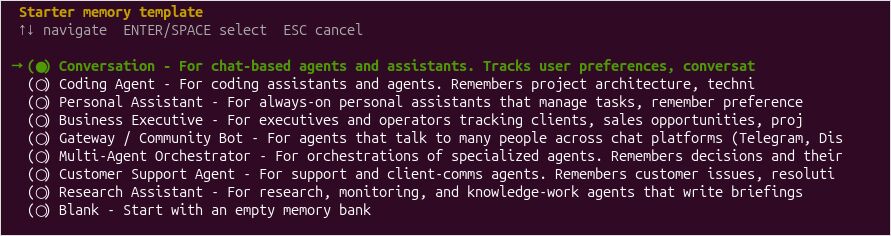
On the Hermes VM, install the catalog plugin, then run the setup wizard. Select Hindsight and the local_external mode; the plugin does not need to start embedded PostgreSQL or run the Hindsight model stack locally, and local_embedded would start a second Hindsight daemon beside the container you just ran.
hermes plugins install hindsight
hermes memory setup hindsight
There will be Interesting set of options of agent role using hindsight
hermes memory status
The external Hindsight connection lives in ~/.hermes/hindsight/config.json. An illustrative configuration is:
{
  "mode": "local_external",
  "api_url": "http://HINDSIGHT_VM_IP:8888",
  "bank_id": "hermes",
  "memory_mode": "hybrid",
  "auto_recall": true,
  "recall_sync": false,
  "auto_retain": true,
  "retain_async": true,
  "retain_every_n_turns": 1
}
recall_sync: false prioritizes interactive responsiveness but may inject recalled context on the following turn. Use synchronous recall when the current request must incorporate the latest memories before the model starts answering. retain_async: true avoids blocking ordinary responses while memories are processed.
Leave recall_prefetch_method at recall: setting it to reflect spends a chat-model call before every turn and injects a synthesis rather than the underlying facts, which is the loop described in the memory-loops article. The plugin’s recall default is observations only; raw world and experience facts stay in the bank and out of the prompt until consolidation has written an observation, or until you widen recall_types to observation,world,experience. Widening it for the first week and watching the control plane, then narrowing, is a reasonable order.
Built-in Hermes memory stays active next to the provider; keeping MEMORY.md and USER.md on while you learn what Hindsight adds is fine, and the memory-system article is the place to decide whether the flat files should stay.
Restart the gateway if it is already running:
hermes gateway restart
hermes memory status
The status should identify Hindsight as the active provider. For a wider command reference, including Hermes’ TUI and plugin commands, see the Hermes Agent CLI cheatsheet.
Validate Memory, Not Just Installation
Ask Hermes to remember a disposable fact about a test project, start another session, and ask for that fact again. Retention is asynchronous by default and extraction waits on the chat model, so give the main llama.cpp server a moment before judging. Then test a harder case: tell Hermes that an earlier decision has changed and ask which decision is current and why. Check Hindsight’s UI and stored observations rather than assuming memory status proves ingestion and recall are correct.
If the answer comes back empty, inspect the control plane before changing models. A retain can succeed and still be invisible to recall while recall_types is observations only and consolidation has not run — widening recall_types is the first check. A connection refused in the embedding server log means the container cannot reach the embedding port, and all-zero reranker scores mean the GGUF is the wrong conversion.
Be cautious with automatic writes. If you want explicitly approved retention rather than continuous capture, set auto_retain to false and use the plugin’s hindsight_retain tool deliberately. That disables automatic storage; it does not add a human approval dialog to every tool invocation.
Troubleshooting and Operational Notes
| Symptom | Likely cause | First check |
|---|---|---|
| Hermes says provider unavailable | Wrong local_external URL or network rule |
curl http://HINDSIGHT_VM_IP:8888/health |
| Docker starts, PostgreSQL errors | Missing extension, wrong credentials, or insufficient shared memory | Container logs and pg_extension |
| Embeddings return 401 or 404 | Incorrect OpenAI-compatible URL, wrong env key name, or model alias mismatch | Direct /v1/embeddings test and variable names |
| Reranking fails | Endpoint or response format mismatch, including doubled /rerank path |
Direct /v1/rerank test and container log |
| Recall returns nothing usable | recall_types limited to observations, or zero reranker scores |
Control plane, then recall_types, then reranker conversion |
| Existing bank reports dimension mismatch | Embedding model changed | Rebuild vectors/reimport with a consistent model |
| Hermes responses slow down | Synchronous recall or shared LLM contention | Turn off sync recall; cap retain concurrency |
| Irrelevant memories repeat | Weak extraction, noisy retrieval, or insufficient consolidation | Inspect observations and relevance scores |
A practical small deployment is 2-4 vCPUs and 4-6 GB RAM for the Hindsight API VM when PostgreSQL and all inference are external. Disk allocation still depends on the chosen Docker image and retained image layers; allocate roughly 30-40 GB initially with room to expand. Size the PostgreSQL host based on actual memory volume, storage performance, and the other databases it serves.
Long-term memory should remain observable, reversible, and easy to back up. Back up the PostgreSQL database independently of the Hindsight container, and prefer explicit retention until you have confidence in what the extraction model stores. An agent that answers from stale memories is harder to fix than one that simply asks again.
